
Real-time downtime tracking software for visible gains in just a few weeks.
TEEPTRAK captures every stop planned, unplanned, micro-stoppages automatically and in real time, without a complex MES project.







Designed for plants that don't have two years to devote to an MES project

TEEPTRAK is designed for industrial sites that want to track and reduce downtime in real time, identify root causes instantly and involve operators in continuous improvement, without having to set up a complex MES over several years.
Without real-time downtime tracking, your workshop operates in the dark
In many plants, downtime tracking is still based on Excel spreadsheets, paper sheets and manual readings. The result:

Detection
Micro-stoppages under 5 minutes go completely untracked.

Reliability
Downtime reasons are logged hours later from memory, rarely accurate.

Lost Time
Operators spend more time filling in paperwork than producing.

Control
Maintenance and production teams can’t prioritize the right actions.
Without real-time downtime tracking, your workshop operates in the dark
In many plants, downtime is only discovered at the end of the shift. With TEEPTRAK, you get:
- Automatic stop detection : Every downtime event captured in real time, including micro-stops.
- Root cause analysis : Operators tag downtime reasons in one tap on a tablet.
- Live Pareto charts : See your top downtime causes instantly, shift by shift.
- Faster response : Maintenance teams react in minutes, not hours.

All-in-one, turnkey industrial solutions
Real-time downtime tracking. Detect every stop and micro-stop instantly.

Optimize cycle times and identify bottlenecks in manual assembly

Monitor temperature, pressure and humidity in real time with IoT sensors.

Catch every deviation before it becomes a defect with our IoT sensors.

How TEEPTRAK digitizes your OEE in real time
TEEPTRAK combines software modules with sensors and operator tablets to capture, enrich and visualize all your critical line data.
|
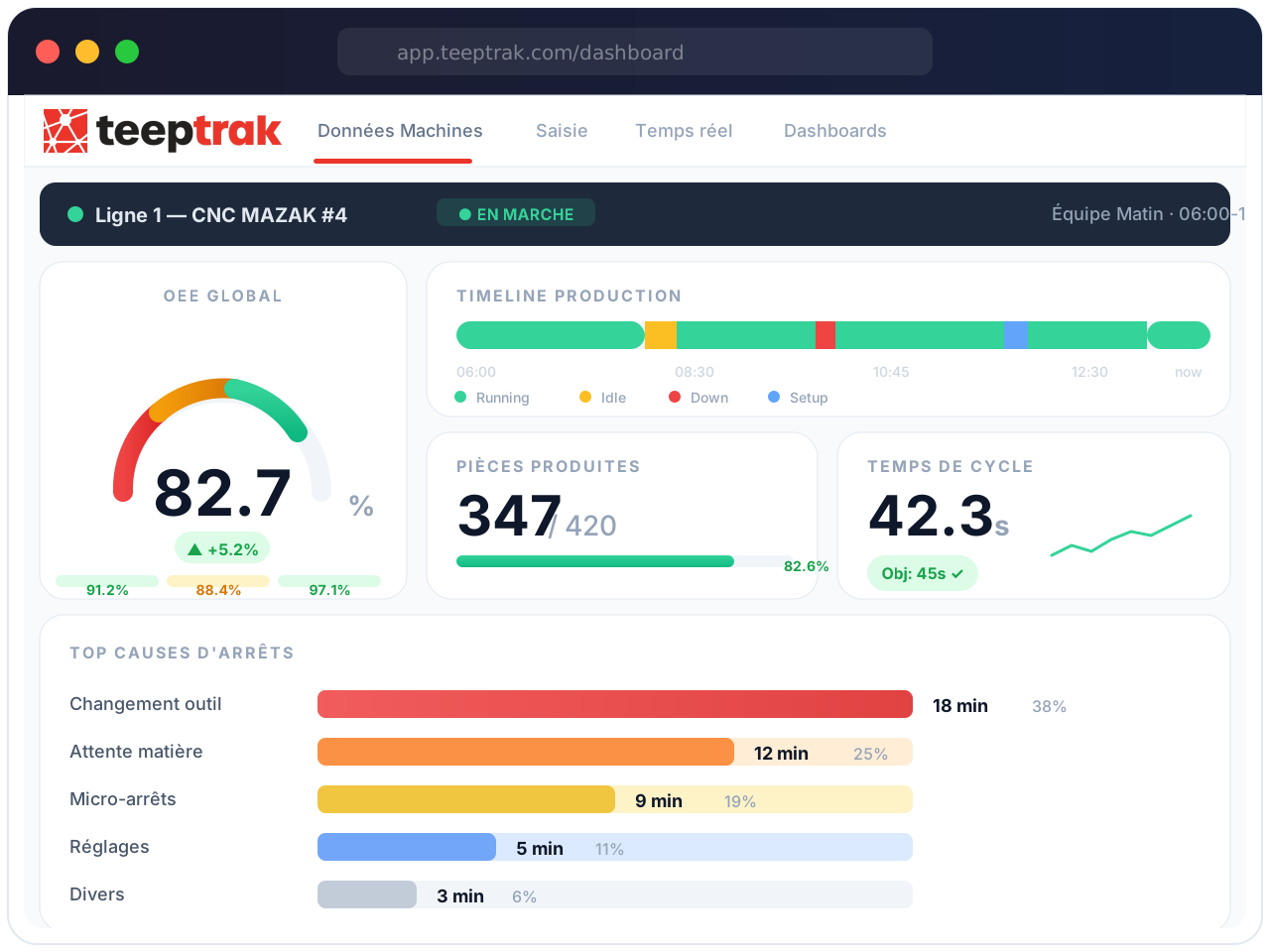
MACHINE DATA Automatic machine data acquisitionConnected sensors and boxes retrieve machine signals (running times, stoppages, production quantities, scrap, cadence, etc.), even from older equipment. No need to change PLCs.
Compatible with all machines, whatever their age, make or technology. No modification of existing machines is required.
Installation in less than 30 minutes per machine, with no production downtime. Your data is up and running from day one.
|
 |

|
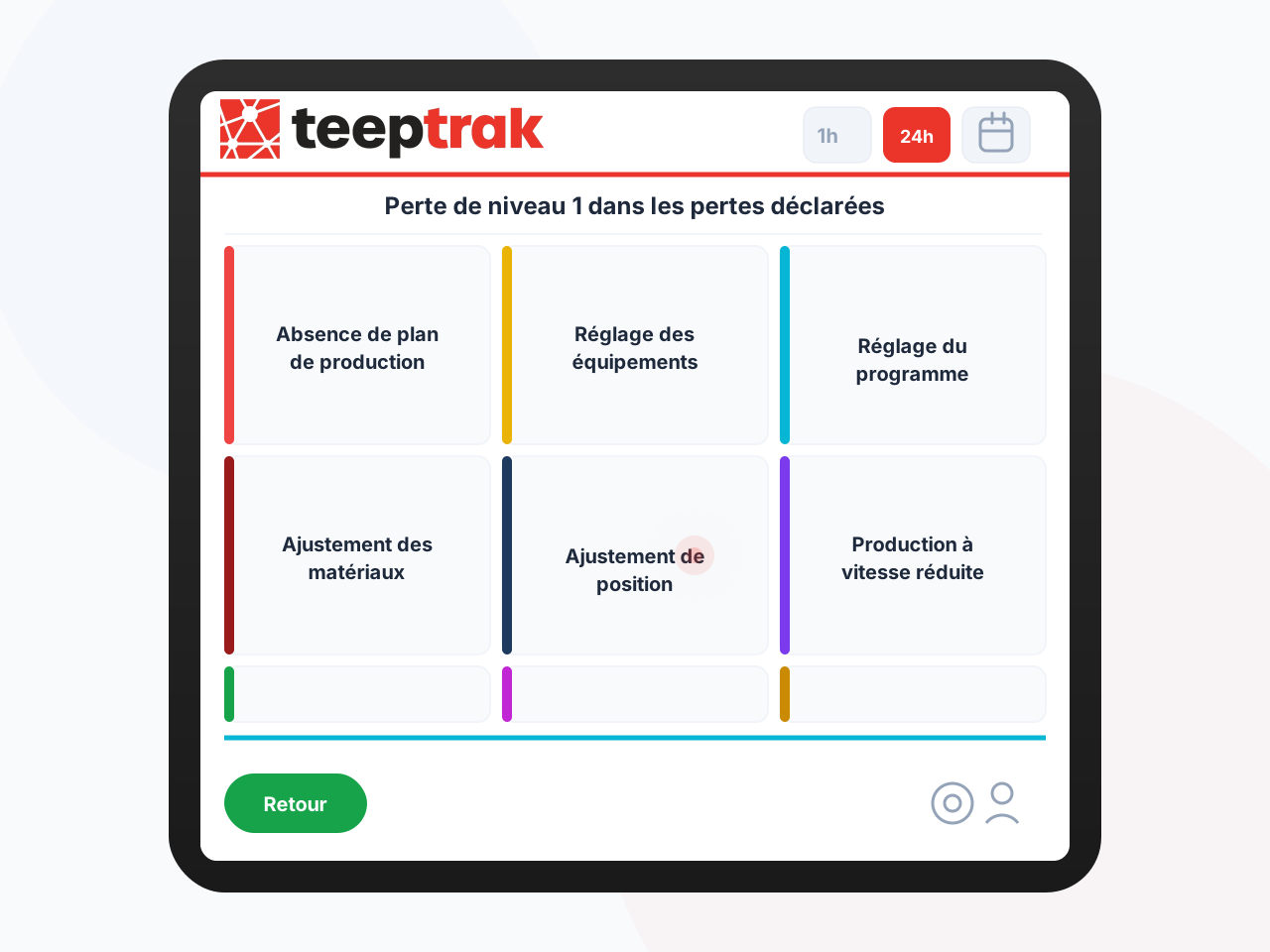
FAST, EASY DATA ENTRY Simplified operator input on industrial tabletsFor each loss, the operator can enter the actual cause of the stoppage or non-quality in just a few clicks. Machine data is thus enriched by the field, without paperwork.
Intuitive interface designed for the field, no need for complex training. In 2 clicks, the operator qualifies each stop directly from his line.
No more Excel files or paper reports. Downtime causes are categorized in real time, ready for immediate Pareto analysis.
|
 |
|
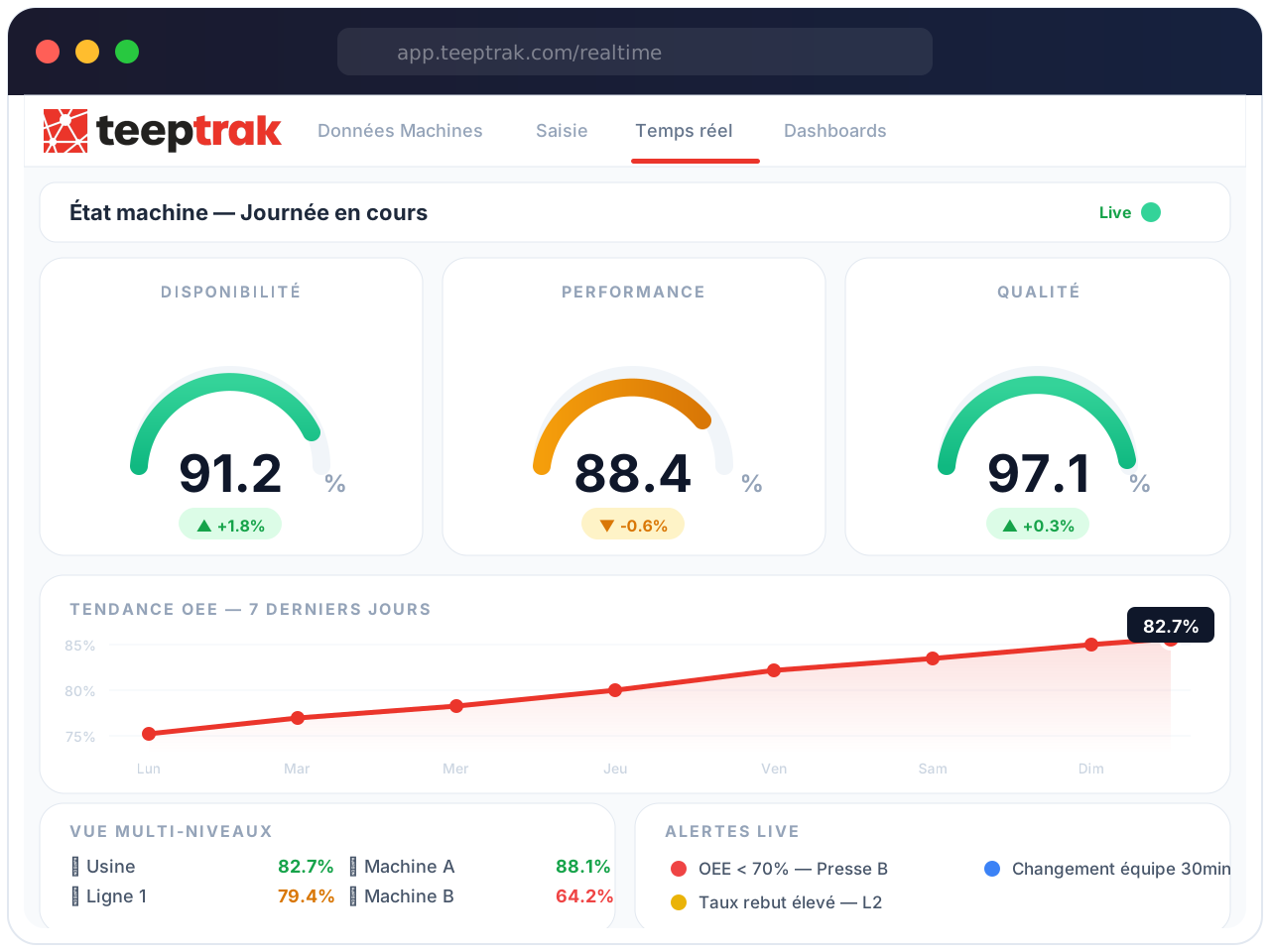
REAL-TIME CALCULATION Real-time OEE calculationAvailability, performance, quality, OEE,TEEP … all indicators are automatically calculated and continuously updated for each machine, line, team, workshop.
Zero manual calculations, zero delays. Your OEE updates second by second, so you don’t have to wait for the next day’s report to take action.
Instant multi-level overview from individual machine to entire plant. Compare teams, lines and workshops at a glance.
|
 |
|
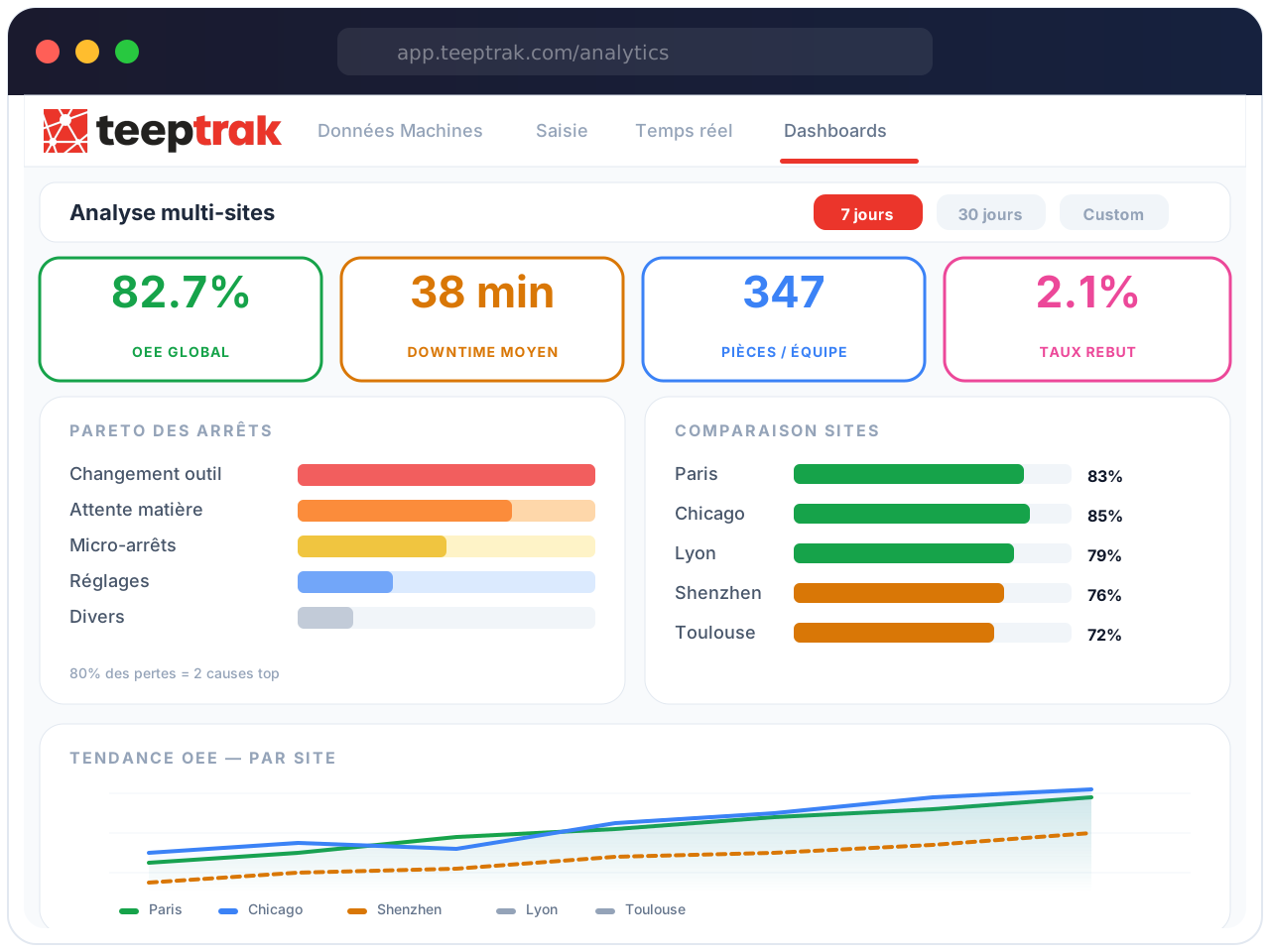
DASHBOARDS & ANALYSIS Multi-site dashboards & loss analysisReal-time dashboards, stoppage and scrap paretos, comparisons between lines, teams, sites, periods… Your teams immediately see where the most critical losses are hiding.
Identify your biggest earnings potential in just one click. Automatic Paretos classify your losses by impact, so you know exactly where to start.
Multi-site access from anywhere. Whether you’re a plant manager or a team leader, you’ll be able to find your own tailor-made KPIs, from your smartphone to your workshop screen.
|
 |
|
MACHINE DATA Automatic machine data acquisitionConnected sensors and boxes retrieve machine signals (running times, stoppages, production quantities, scrap, cadence, etc.), even from older equipment. No need to change PLCs.
Compatible with all machines, whatever their age, make or technology. No modification of existing machines is required.
Installation in less than 30 minutes per machine, with no production downtime. Your data is up and running from day one.
|
|
|
FAST, EASY DATA ENTRY Simplified operator input on industrial tabletsFor each loss, the operator can enter the actual cause of the stoppage or non-quality in just a few clicks. Machine data is thus enriched by the field, without paperwork.
Intuitive interface designed for the field, no need for complex training. In 2 clicks, the operator qualifies each stop directly from his line.
No more Excel files or paper reports. Downtime causes are categorized in real time, ready for immediate Pareto analysis.
|
|
|
REAL-TIME CALCULATION Real-time OEE calculationAvailability, performance, quality, OEE,TEEP … all indicators are automatically calculated and continuously updated for each machine, line, team, workshop.
Zero manual calculations, zero delays. Your TRS/OEE updates second by second, so you don’t have to wait for the next day’s report to take action.
Instant multi-level overview from individual machine to entire plant. Compare teams, lines and workshops at a glance.
|
|
|
DASHBOARDS & ANALYSIS Multi-site dashboards & loss analysisReal-time dashboards, stoppage and scrap paretos, comparisons between lines, teams, sites, periods… Your teams immediately see where the most critical losses are hiding.
Identify your biggest earnings potential in just one click. Automatic Paretos classify your losses by impact, so you know exactly where to start.
Multi-site access from anywhere. Whether you’re a plant manager or a team leader, you’ll be able to find your own tailor-made KPIs, from your smartphone to your workshop screen.
|
|
Concrete results for our industrial customers
Food industry
%
of product volume By reducing microstops.
Automotive
OEE points On several lines, attacking losses in real time.
Electronics
%
of unplanned stoppages thanks to immediate + standardized detection of stoppage causes.
International
%
Equipped plants From small businesses to major groups
Why choose TEEPTRAK as your real-time production monitoring software?

OEE Specialist

Multi-site, multi-language

Designed for operators

ROI in just a few weeks
The results our customers see every day

The tool was quickly adopted by all our production lines, thanks to its intuitive interface and clear, real-time dashboards. Operators use it on a daily basis for short-interval control, while supervisors rely on the 24-hour view to maintain performance.

Real-time OEE tracking, stoppage capture and empowerment of the field at 3 sites. Strengths: Fast deployment, operator-friendly interface, clear OEE and loss trees, actionable alerts, easy BI exports and APIs. Areas for improvement: More native templates for multi-site...

The tool has been deployed on all our automated equipment. The expected results are there for all to see: strong adoption by operators and technical teams, elimination of paper and Excel, rapid gains in OEE (work on micro-stops, team organization, etc.).
Ready to unlock the hidden performance of your production?

Let’s talk about your lines, your constraints and the gains TEEPTRAK can make for you.
Download the case study
Guided pilot
Request a demo
Downtime tracking software automatically records every machine stop in real time, captures the reason at the machine, and ranks your losses so teams fix the biggest ones first. TEEPTRAK detects stops and micro-stops from non-intrusive sensors or PLC/OPC UA signals, lets operators tag reasons on a tablet, and turns the data into live Pareto charts, shift reports and OEE availability.
TEEPTRAK runs in 700+ plants in 30 countries, including sites for Hutchinson, Safran, Alstom and Stellantis. Live data within 48 hours of installation, with no MES project and no changes to your PLC programs.
Last updated: October 2026. Disclosure: TEEPTRAK publishes this guide.
Why manual downtime logs fail
Most plants still track downtime on paper, whiteboards or spreadsheets. The numbers look complete, but they miss most of the story:
- Short stops disappear. Nobody writes down a 40-second jam, yet dozens of them per shift add up to hours.
- Reasons are guessed. Causes are entered at the end of the shift, from memory, often as “other”.
- Operators do paperwork instead of running the line.
- Priorities are argued, not measured. Maintenance and production debate which problem matters most because no one trusts the data.
Automatic downtime detection vs manual logging
Automatic downtime detection removes the guesswork. A sensor or controller signal tells the system the exact second a machine stops and restarts. The operator only adds what a sensor cannot know: why it stopped.
| Criterion | Manual logging (paper, Excel) | Automatic detection (TEEPTRAK) |
|---|---|---|
| Stop start and end time | Estimated, rounded | Recorded to the second |
| Micro-stops | Rarely captured | Captured as they happen |
| Reason codes | Written later, from memory | Tagged at the machine on a tablet |
| Time to see results | Next day or next week | Live dashboards |
| Operator effort | Forms and data entry | A couple of taps per stop |
| Data trust | Disputed | Shared, objective record |
If you are starting from zero, our guide on how to set up equipment downtime tracking walks through the first steps line by line.
What TEEPTRAK downtime tracking software does
Real-time downtime monitoring on any machine
TEEPTRAK connects to new and legacy equipment. Non-intrusive sensors read run signals, counts and cycle rates on older machines, while OPC UA and PLC connectors pull data from modern controllers. Either way, real-time downtime monitoring starts without rewiring your process or editing PLC logic.
Micro-stop tracking
Micro-stops are the short interruptions (jams, misfeeds, sensor faults, waiting for material) that never reach a logbook. Micro-stop tracking makes them visible by frequency and duration, by machine and by shift. Plants typically agree on a threshold (for example, 2 or 5 minutes) that separates micro-stops from longer breakdowns so each loss lands in the right OEE category.
Downtime reason codes at the machine
When a stop occurs, the operator tablet at the line prompts for a reason. Operators select from a short, structured list of downtime reason codes, so data stays consistent across shifts and sites. Good code design matters: too many codes and operators pick the first one, too few and you cannot act. See our downtime reason codes list for a proven starting structure.
Live Pareto of losses
Every tagged stop feeds a live Pareto chart that ranks causes by lost time and by number of occurrences. Filter by line, product, shift or week. The top three bars are usually where your next improvement project should start.
Direct link to OEE availability
Downtime is the core of the availability factor in OEE:
Availability = Run time / Planned production time
Because TEEPTRAK records stops automatically, availability, performance, quality, OEE and TEEP are calculated continuously, from a single machine up to a plant and, with MoniTrak, across multiple sites.
Shift reports and alerts
Supervisors get shift reports that summarize stops, top causes and OEE for each line, ready for the start-of-shift meeting. Alerts notify the right people when a machine stays down too long, so maintenance responds while the problem is still in progress, not hours later.
JEMBA AI root cause analysis
JEMBA, TEEPTRAK’s AI layer, analyzes downtime history together with machine and process data to surface patterns people miss: stops that cluster around a product changeover, a specific shift, a material batch or a drifting process parameter. It points teams toward likely root causes and helps them prioritize corrective actions.
Integration with ERP, CMMS and quality tools
TEEPTRAK works alongside your existing systems. An API lets you export downtime events and KPIs to your ERP, CMMS or BI tools, for example to open a maintenance work order from a recurring breakdown or to compare planned and actual capacity.
Download the free asset
Instant download. No email confirmation needed.
Worked example: what micro-stops cost (hypothetical)
Example with hypothetical numbers, for illustration only. A packaging line runs 2 shifts of 8 hours, 5 days a week: 80 planned hours. Manual logs show 4 hours of breakdowns per week. After installing a machine downtime tracking system, the plant discovers an additional 5 hours per week of micro-stops that were never recorded.
- Hidden loss: 5 hours per week, at a nominal rate of 600 parts per hour, equals 3,000 parts per week not produced.
- If the team removes the top two micro-stop causes from the Pareto and recovers 2 of those 5 hours, the line gains 1,200 parts per week with no new equipment.
- Multiply recovered parts by your contribution margin per part to estimate the annual value for your own line.
Real results depend on your baseline. Across customer deployments, TEEPTRAK reports +29 OEE points on average, and Hutchinson raised OEE from 47% to 72%.
How to choose downtime tracking software: buyer checklist
Use this checklist when you compare downtime tracking software vendors:
- Automatic detection: Does it capture stops from machine signals, or does it depend on operators to start and stop timers?
- Legacy coverage: Can it connect older machines without controllers, as well as modern PLCs via OPC UA?
- Micro-stops: Does it record short stops, and can you set the threshold between micro-stops and breakdowns?
- Reason capture: Is reason entry at the machine, fast, and based on a structured code tree you control?
- Analysis: Are Pareto charts, shift reports and OEE availability built in and live?
- Response: Can the system alert maintenance or supervisors when a stop exceeds a set duration?
- Root cause support: Does it help explain why losses happen, not only where?
- Integration: Is there an API for ERP, CMMS and BI exports?
- Deployment: How long until you see live data, and who supports the rollout?
- Scale: Can you compare lines and plants with consistent definitions?
Downtime tracking software vendors: who fits best
US buyers usually compare a handful of options. Each takes a different approach, so the right choice depends on your equipment, team and goals. Descriptions below reflect each vendor’s public positioning.
TEEPTRAK (our platform)
Best for multi-line and multi-site manufacturers that want automatic stop detection on mixed new and legacy equipment, operator reason codes at the machine, and AI root cause analysis with JEMBA. Rolled out through a 90-day Guided pilot supervised by TEEPTRAK engineers.
Vorne XL
Best for plants that want a plug-in device with a large visual scoreboard at the line. Vorne XL combines machine monitoring with a highly visible display aimed at driving operator awareness of OEE and downtime.
MachineMetrics
Best for discrete manufacturers with many CNC machines. MachineMetrics focuses on CNC and machine-tool connectivity and machine data analytics.
Guidewheel
Best for teams that want to start quickly with clip-on sensors. Guidewheel uses sensors that read machine power draw to monitor equipment state and downtime across many machine types.
Evocon
Best for small and mid-sized plants looking for a straightforward cloud OEE tool. Evocon offers sensor-based production monitoring with a simple, standardized setup.
Redzone
Best for organizations focused on frontline workforce engagement. Redzone positions itself as a connected workforce platform, with team-based tools for meetings, communication and performance, and is widely used in food and beverage.
For broader comparisons, see our reviews of OEE software for 2026 and production monitoring software.
How we evaluated
We compared options on the criteria US plant managers and CI leads raise most often in buying conversations:
- Method of stop detection (machine signal, sensor, or manual entry)
- Ability to connect legacy equipment as well as modern controllers
- Micro-stop visibility and reason-code capture at the machine
- Built-in analysis: Pareto, shift reports, OEE availability
- Integration options (API, ERP, CMMS)
- Deployment model and time to first live data
- Fit for single-site versus multi-site operations
Vendor descriptions are based on publicly available positioning as of October 2026. Check details directly with each vendor before you buy.
Frequently asked questions
What is downtime tracking software?
Downtime tracking software automatically records when machines stop and restart, captures the reason for each stop, and analyzes the results so teams can reduce lost production time. It replaces paper logs and spreadsheets with real-time, objective data.
Can TEEPTRAK detect micro-stops?
Yes. TEEPTRAK detects stops directly from machine signals, so short interruptions are captured and analyzed by frequency and duration, not just long breakdowns.
How do operators enter downtime reason codes?
Operators use a tablet at the machine. When a stop is detected, they select the reason from a structured list in a couple of taps, so causes are recorded while the facts are fresh.
How is downtime tracking different from an MES?
An MES manages the full production process, from orders to traceability, and is usually a large project. TEEPTRAK focuses on capturing stops, losses and OEE quickly, with live data within 48 hours of installation, and works alongside an existing MES or ERP.
Does TEEPTRAK integrate with our CMMS or ERP?
Yes. TEEPTRAK works alongside your existing CMMS, ERP and quality tools, and an API lets you export downtime events and KPIs to those systems.
How do we get started?
Start with a 90-day Guided pilot. A TEEPTRAK engineer instruments one line, establishes a downtime and OEE baseline, and runs regular reviews with your team so you can measure results before scaling.
See every stop on your line within 48 hours
Instrument one line, get a reliable downtime baseline and a clear list of losses to attack first, supervised by TEEPTRAK engineers.